FM SocketIO(deprecated)
Description
It’s a Server-Clients networking system for the Internet streaming, which requires node.js and socket.io hosting. It supports string and byte[] streaming. (deprecated feature, included in FM WebSocket 1.0, 2.0)
Basic Setup
All the communication between Server, Clients is via FM SocketIO Manager. It requires node.js server for the Internet Streaming, which will route your data in public network. It also requires one Unity3D connection as Server in your whole connection, as it’s Server-Clients based networking system
This package includes example script of a very light-weight node.js server, which you may host it on any Cloud Virtual Machine(linux, windows or mac)
There are two parts in this tutorial setup.
Part A: node.js server
Part B: Unity3D FMSocketIOManager
Part A: Node.js server
Our example server is located in our plugin root folder
/FMWebSocket/TestServer_v2.x.x/Resources/FMWebSocket
- Install npm + node.js Download and install necessary items
https://nodejs.org/en/download/
- install socket io, you may choose one of the below versions
cmd/terminal: npm install socket.io@2.3
cmd/terminal: npm install socket.io@3.1
cmd/terminal: npm install socket.io@4.0
- Install express https://expressjs.com/en/starter/installing.html
cmd/terminal: npm init
cmd/terminal: Enter…
cmd/terminal: npm install express –save
- Install ws module
cmd/terminal: npm install ws
- Finish & Test on localhost
You may follow this step-by-step tutorial, the commands are compatible in Mac/Windows/Linux https://youtu.be/Zjm5KGHyceU
Part B: Unity3D FMSocketIOManager Setup
Setup for Sender Scene(Sender)
- Create a new GameObject in your scene, and name it
FMSocketManager. - Add Component
FMSocketManager.cs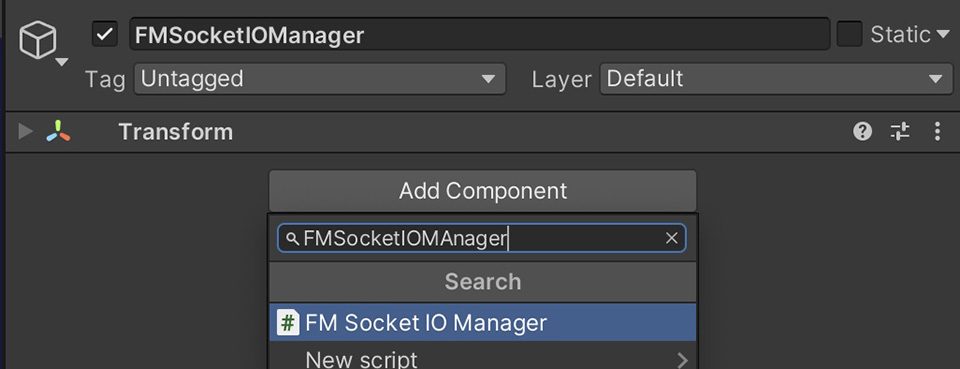
- Choose
NetworkType: Server, Client - enabled
Auto Initis recommended, which will automatically start the connection in runtime. - you may also connect them manually as alternative via script.
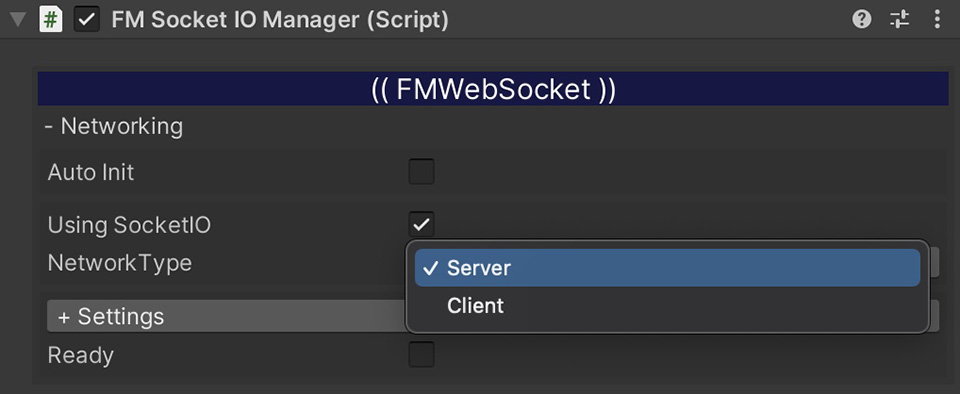
FMSocketIOManager.instance.InitAsServer();
FMSocketIOManager.instance.InitAsClient();